Sharp MX-C300PL Spécifications Page 71 : Remove the misfed paper
 1
 2
 3
 4
 5
 6
 7
 8
 9
 10
 11
 12
 13
 14
 15
 16
 17
 18
 19
 20
 21
 22
 23
 24
 25
 26
 27
 28
 29
 30
 31
 32
 33
 34
 35
 36
 37
 38
 39
 40
 41
 42
 43
 44
 45
 46
 47
 48
 49
 50
 51
 52
 53
 54
 55
 56
 57
 58
 59
 60
 61
 62
 63
 64
 65
 66
 67
 68
 69
 70
 71
 72
 73
 74
 75
 76
 77
 78
 79
 80
 81
 82
 83
 84
 85
 86
 87
 88
 89
 90
 91
 92
 93
 94
 95
 96
 97
 98
 99
 100
 101
 102
 103
 104
 105
 106
 107
 108
71
TROUBLESHOOTING
3
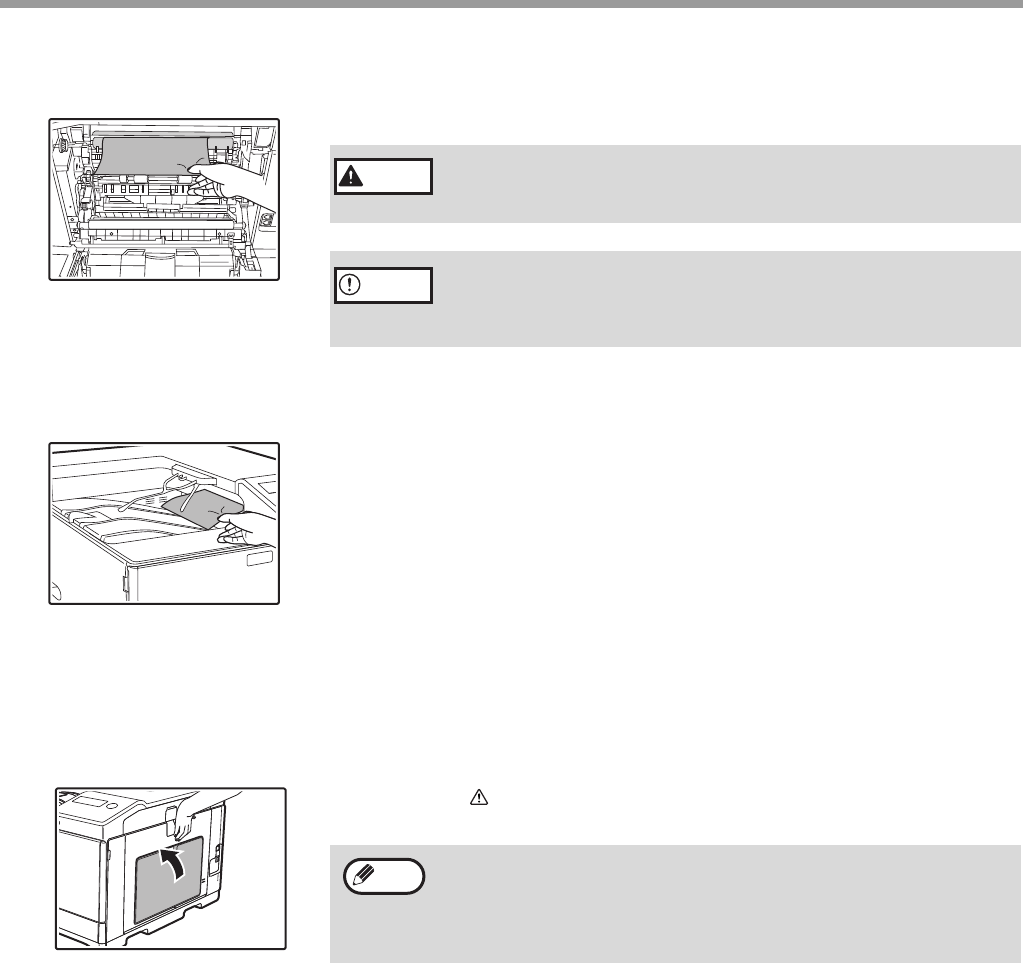
Remove the misfed paper.
Be careful not to tear the misfed paper during removal.
4
If the misfed paper cannot be removed, remove the paper by pulling it into the paper
output area.
Be careful not to tear the misfed paper during removal.
5
Lift the part with the green label that protrudes from the fusing unit paper guide, and
close the fusing unit paper guide.
6
Lift the fusing unit release levers, to return them to their operating positions.
7
Close the side cover.
The message "
Clear paper path." will be cleared and printing will be
possible.
The fusing unit is hot. Do not touch the fusing unit when
removing misfed paper. Doing so may cause a burn or injury.
• When removing misfed paper, do not touch or damage the transfer
belt.
• Be careful about unfixed toner on the misfed paper not to soil your
hands or clothes.
• When closing the side cover, press on the handle.
• If the paper was torn, make sure that no torn pieces remain in the
machine.
• If the message does not clear, check again to make sure that no
pieces of paper remain.
Warning
Caution
Note
Fichier PDF · ·
Questions sur Sharp MX-C300PL
Pas encore de questions sur ce manuel. Posez la première.
Produits connexes et manuels pour Imprimer et scanner Sharp MX-C300PL
- Imprimer et scanner Sharp MX-M200D Manuel d'utilisateur
 (100 pages)
- Imprimer et scanner Sharp AR-4551 Spécifications
 (280 pages)
- Imprimer et scanner Sharp AR-M351N Spécifications
(188 pages)
- Imprimer et scanner Sharp AR-M355 Manuel d'utilisateur
(12 pages)
- Imprimer et scanner Sharp MX-M904 Spécifications
(122 pages)
- Imprimer et scanner Sharp JX-9600 Manuel d'utilisateur
 (14 pages)
- Imprimer et scanner Sharp CE-140P Manuel d'utilisateur
 (60 pages)
- Imprimer et scanner Sharp EL-2607R Spécifications

 (2 pages)
- Imprimer et scanner Sharp DP-750 Manuel de service
(110 pages)
- Imprimer et scanner Sharp AR-M350N/M450N Manuel d'utilisateur
(12 pages)
- Imprimer et scanner Sharp ER-01PU Manuel d'instructions
(241 pages)
- Imprimer et scanner Sharp UX-4000M - UX 4000 B/W Laser Printer Guide de l'utilisateur
(194 pages)
- Imprimer et scanner Sharp AR-NB3 Manuel d'utilisateur
(4 pages)
- Imprimer et scanner Sharp MX-5500N Spécifications
(50 pages)
- Imprimer et scanner Sharp MX-M200D Manuel de service
(121 pages)
- Imprimer et scanner Sharp AR-4551 Manuel d'utilisateur
(44 pages)
- Imprimer et scanner Sharp MX-5500N Manuel d'utilisateur
(6 pages)
- Imprimer et scanner Sharp AR-RB1 Spécifications
(140 pages)
- Imprimer et scanner Sharp AR-M351N Manuel d'utilisateur
(20 pages)
- Imprimer et scanner Sharp FO-2150CM Manuel de service
(132 pages)