Sharp MX-M260 Spécifications Page 13 : OPERATION PANEL
 1
 2
 3
 4
 5
 6
 7
 8
 9
 10
 11
 12
 13
 14
 15
 16
 17
 18
 19
 20
 21
 22
 23
 24
 25
 26
 27
 28
 29
 30
 31
 32
 33
 34
 35
 36
 37
 38
 39
 40
 41
 42
 43
 44
 45
 46
 47
 48
 49
 50
 51
 52
 53
 54
 55
 56
 57
 58
 59
 60
 61
 62
 63
 64
 65
 66
 67
 68
 69
 70
 71
 72
 73
 74
 75
 76
 77
 78
 79
 80
 81
 82
 83
 84
 85
 86
 87
 88
 89
 90
 91
 92
 93
 94
 95
 96
 97
 98
 99
 100
 101
 102
 103
 104
 105
 106
 107
 108
 109
 110
 111
 112
 113
 114
 115
 116
 117
 118
 119
 120
 121
 122
 123
 124
 125
 126
 127
 128
 129
 130
 131
 132
 133
 134
 135
 136
 137
 138
 139
 140
 141
 142
 143
 144
 145
 146
 147
 148
 149
 150
 151
 152
 153
 154
 155
 156
 157
 158
 159
 160
11
BEFORE USING THE MACHINE
1
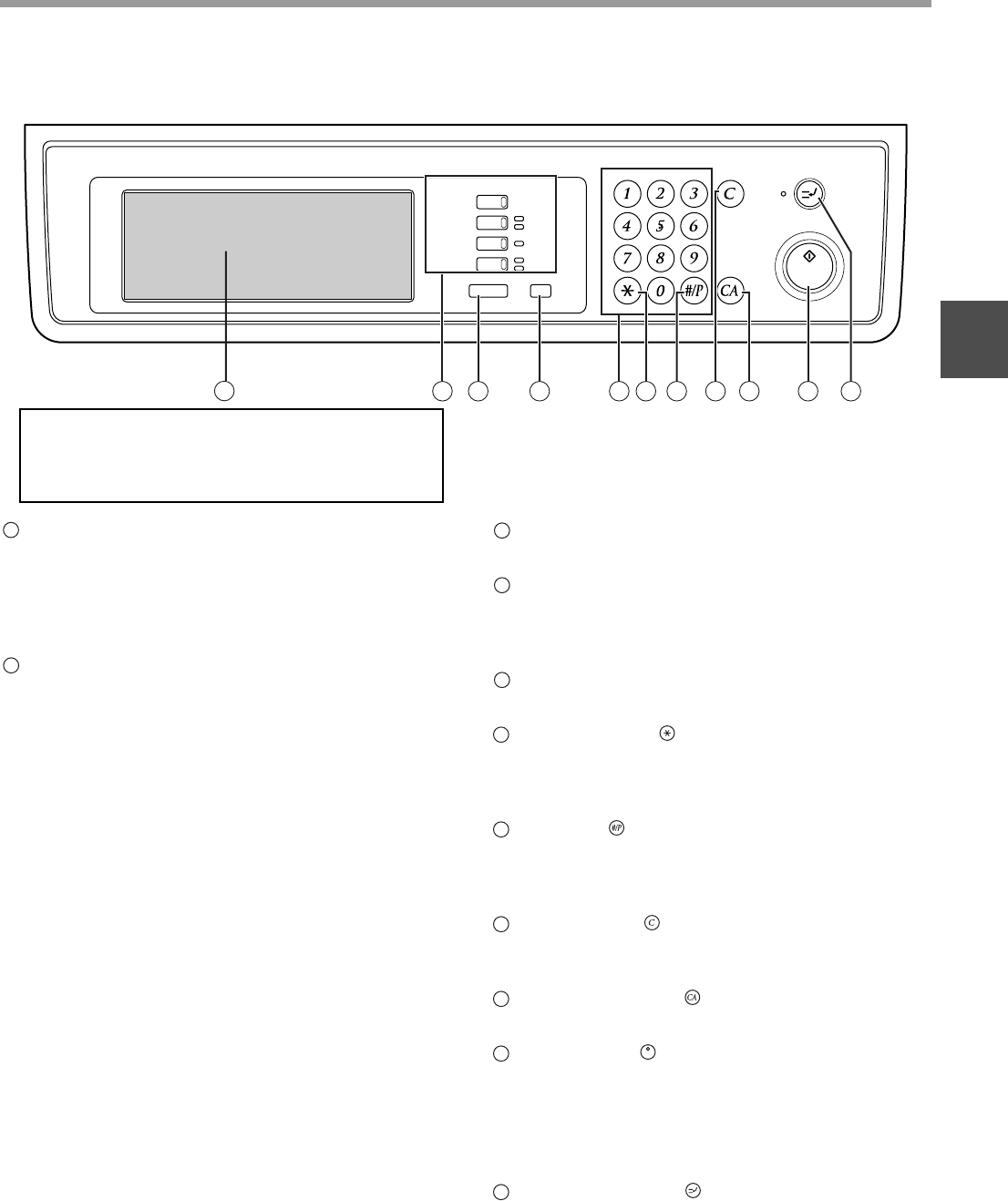
OPERATION PANEL
Touch panel
The machine status, messages and touch keys are
displayed on the panel. The display will show the
status of printing, copying or network scanning
according to the mode that is selected. For details
see the next page.
Mode select keys and indicators
Use to change modes and the corresponding
display on the touch panel.
[COPY] key
Press to select copy mode.
[PRINT] key/ONLINE indicator/
DATA indicator
Press to select print mode.
•
ONLINE indicator
Print jobs can be received when this indicator is lit.
•
DATA indicator
A print job is in memory. The indicator lights
steadily while the job is held in memory, and
blinks while the job is printed.
[SCAN] key/DATA indicator (When the network
scanner option is installed.)
Press to select network scan mode when the
network scanner option is installed.
•
DATA indicator
Lights steadily or blinks while a scanned image
is being sent.
(See "4. NETWORK SCANNER FUNCTION".)
[FAX] key/LINE indicator/DATA indicator (When
the fax option is installed.)
Press to select fax mode when the fax option is
installed.
•
LINE indicator
this lights up while faxes are being sent or
received.
•
DATA indicator
Blinks when a fax has been received to memory
and lights steadily when a fax is waiting in
memory for transmission.
(See operation manual for facsimile.)
[JOB STATUS] key
Press to display the current job status. (p.13)
[SYSTEM SETTINGS] key
Use to adjust various settings of the machine
including the contrast of the touch panel and
administrator settings. (p.91)
Numeric keys
Use to enter numeric values for various settings.
[LOGOUT] key (
)
When auditing mode is enabled, press this key
after finishing a job to return the machine to
account number entry standby.
[#/P] key (
)
Use this key to execute a job program in copy
mode.
The key is also used to dial in fax mode.
[CLEAR] key (
)
Press to clear a copy number setting or cancel a
job.
[CLEAR ALL] key (
)
Resets the settings to the initial settings.
[START] key (
)
Press in copy mode, scanner mode, or fax mode to
begin copying, network scanning, or faxing.
This key blinks when auto power shut mode has
activated. Press the key to return to normal
operation.
[INTERRUPT] key (
)
Use to perform an interrupt copy job. (p.35)
JOB STATUS
COPY
PRINT
SCAN
FAX
ON LINE
DATA
DATA
LINE
DATA
SYSTEM SETTINGS
LOGOUT
10
11
2
3
4
5
6
9
7
8
1
●
The indicators of the operation panel may differ
depending on the country and region.
●
The indicators of the operation panel may varies
by model.
1
2
3
4
5
6
7
8
9
10
11
Fichier PDF · ·
Questions sur Sharp MX-M260
Pas encore de questions sur ce manuel. Posez la première.
Produits connexes et manuels pour Multifonctionnels Sharp MX-M260
- Multifonctionnels Sharp MX-M362N Spécifications
 (56 pages)
- Multifonctionnels Sharp MX-LCX3 Spécifications
(76 pages)
- Multifonctionnels Sharp AR-FR11 Manuel d'utilisateur
(6 pages)
- Multifonctionnels Sharp MX-M363U Guide d'installation
(112 pages)
- Multifonctionnels Sharp DX-C401FX Manuel d'utilisateur
(12 pages)
- Multifonctionnels Sharp MX-5000N Manuel d'utilisateur
(2 pages)
- Multifonctionnels Sharp AL-2040CS Manuel d'utilisateur
 (82 pages)
- Multifonctionnels Sharp AR-C250 Spécifications
(161 pages)
- Multifonctionnels Sharp MX-2301N Spécifications
(116 pages)
- Multifonctionnels Sharp MX-4101N Spécifications
(76 pages)
- Multifonctionnels Sharp JW-20FLT Manuel d'utilisateur
(197 pages)
- Multifonctionnels Sharp MX-C381 Spécifications
(148 pages)
- Multifonctionnels Sharp MX-M260 Manuel d'utilisateur
(160 pages)
- Multifonctionnels Sharp MX-4101N Spécifications
(12 pages)
- Multifonctionnels Sharp MX-M564N Manuel d'utilisateur
(8 pages)
- Multifonctionnels Sharp MX-M564N Manuel d'utilisateur
(8 pages)
- Multifonctionnels Sharp CPD-3830 Manuel d'utilisateur
(1 pages)
- Multifonctionnels Sharp MX-2010U Manuel d'utilisateur
(12 pages)
- Multifonctionnels Sharp MX-B381 Manuel d'utilisateur
(12 pages)
- Multifonctionnels Sharp MX-7500N Manuel d'utilisateur
(30 pages)