Sharp MX-4140N Manuel d'installation Page 17

  • Télécharger
  • Ajouter à mon manuel
  • Imprimer
  • Page
    / 19
  • Table des matières
  • MARQUE LIVRES
  • Noté. / 5. Basé sur avis des utilisateurs
Vue de la page 16
MX-5141FN MX-4140N/4141N/5140N/5141N (MAIN UNIT) 2 – 13
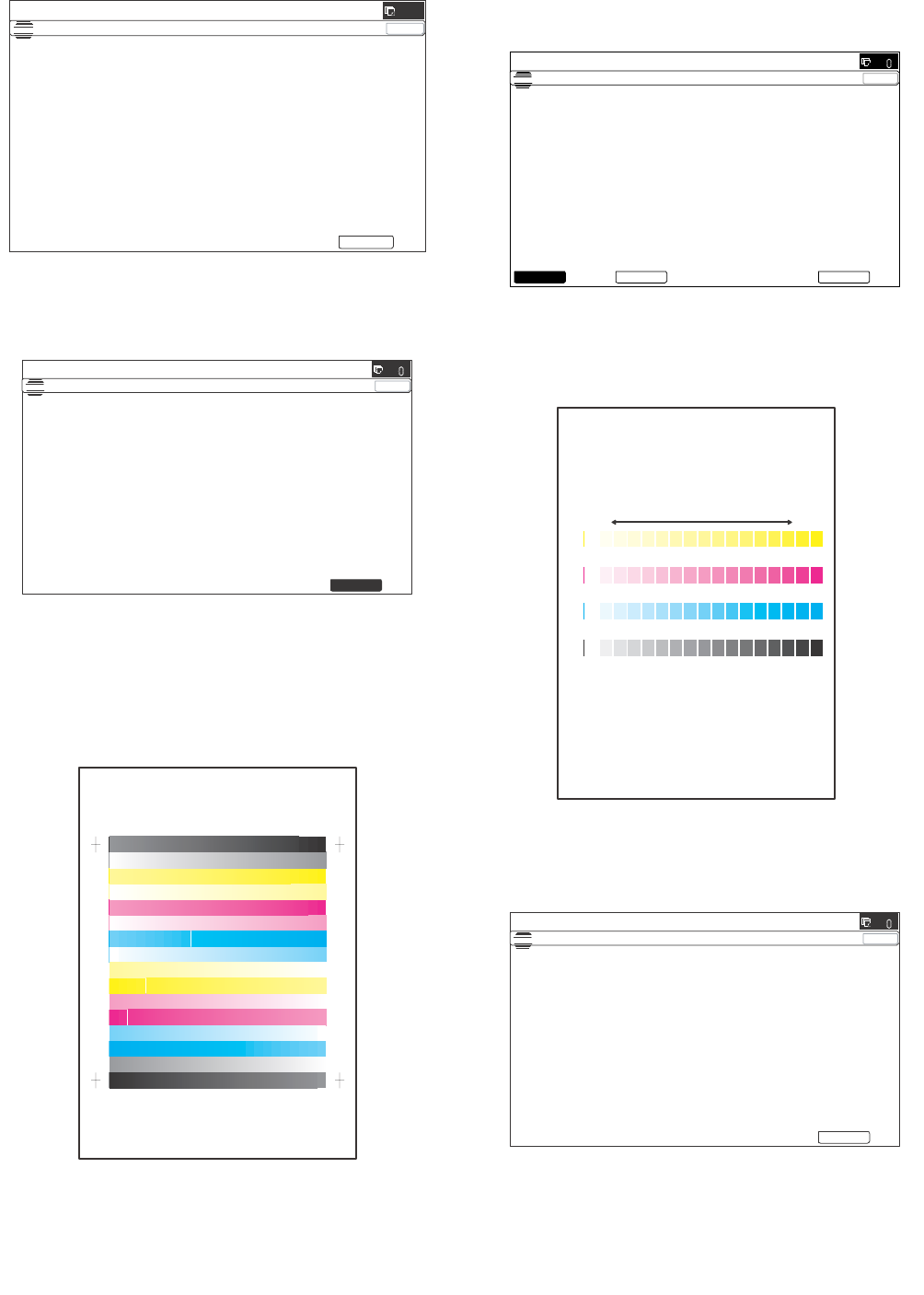
(4) Copy/Printer color balance and density adjustment
(Automatic adjustment)
1) Enter the SIM46-74 mode.
2) Press [EXECUTE] key.
The high density process control is performed, and the copy
color patch image (adjustment pattern) is printed out.
(A4/11" x 8.5" or A3/11" x 17" paper is automatically selected.)
3) Set the color patch image (adjustment pattern) paper printed in
procedure 2) on the document table.
Set the color patch image (adjustment pattern) printed in the
procedure 2) on the document table. Place the color patch
image so that the fine lines are on the left side. At that time,
place 5 sheets of white paper on the printed color patch image
(adjustment pattern).
4) Select [FACTORY] target, and press [EXECUTE] key.
When the color balance is customized by the manual color bal-
ance adjustment (SIM 46-21) according to the user's request,
and the color balance is registered with SIM63-7 as the service
target, if the color balance is required to be adjusted, select the
[SERVICE] target.
The copy color balance adjustment is automatically executed
and prints the color balance check patch image.
If there is any streak or unclear print on the printed check pat-
tern, check the print engine for any problems.
5) Press [EXECUTE] key.
The printer color patch image (adjustment pattern) is printed
out. (A4/11" x 8.5" or A3/11" x 17" paper is automatically
selected.)
ǂǂǂ6,08/$7,21ǂǂ12
&/26(
7(67
(1*,1($872$'-8670(176(59,&(

(;(&87(
35(66>(;(&87(@72352&21(;(&87,21$1'35,177+(7(673$7&+
3/($6(86(63(&,),('7<3(2)$$25;;6,=(3$3(5
)257+,6$'-8670(17
ǂǂǂ6,08/$7,21ǂǂ12
&/26(
7(67
(1*,1($872$'-8670(176(59,&(

(;(&87(
352&21(;(&87,1*
ǂǂǂ6,08/$7,21ǂǂ12
&/26(
7(67
(1*,1($872$'-8670(176(59,&(

3/($6(6(/(&77+(02'()$&725<256(59,&($1'3/$&(
7+(35,17('7(673$7&+21'2&80(17*/$667+(135(66>(;(&87(@
/,*+7$5($$7/()76,'(21'2&80(17*/$66
(;(&87(6(59,&()$&725<
QO PNMLKJIHGFEDCBA
Y
M
C
Bk
High
density
Low
density
ǂǂǂ6,08/$7,21ǂǂ12
&/26(
7(67
(1*,1($872$'-8670(176(59,&(

&21),507+($'-3$7&+$1'35(66>(;(&87(@72$'-2)5(*,675$7,21(;(
$1'35,177+(7(673$7&+
3/($6(86(63(&,),('7<3(2)$25h6,=(3$3(5
)257+,6$'-8670(17
(;(&87(
Vue de la page 16
1 2 ... 12 13 14 15 16 17 18 19

Commentaires sur ces manuels

Pas de commentaire