Sharp MX-4101N Spécifications Page 46 : CHANGING THE PORT
 1
 2
 3
 4
 5
 6
 7
 8
 9
 10
 11
 12
 13
 14
 15
 16
 17
 18
 19
 20
 21
 22
 23
 24
 25
 26
 27
 28
 29
 30
 31
 32
 33
 34
 35
 36
 37
 38
 39
 40
 41
 42
 43
 44
 45
 46
 47
 48
 49
 50
 51
 52
 53
 54
 55
 56
 57
 58
 59
 60
 61
 62
 63
 64
 65
 66
 67
 68
 69
 70
 71
 72
 73
 74
 75
 76
29
CHANGING THE PORT
When using the machine in a Windows environment, follow the steps below to change the port when you have changed
the IP address of the machine or have installed the PC-Fax driver when the machine is connected with a USB cable.
1
Click the [Start] button (
), click
[Control Panel], and then click [Printer].
• In Windows XP/Server 2003, click the [start] button
and then click [Printers and Faxes].
• In Windows 98/Me/NT 4.0/2000, click the [Start]
button, select [Settings], and then click [Printers].
2
Open the printer properties window.
(1) Right-click the printer driver icon of the
machine.
(2) Select [Properties].
3
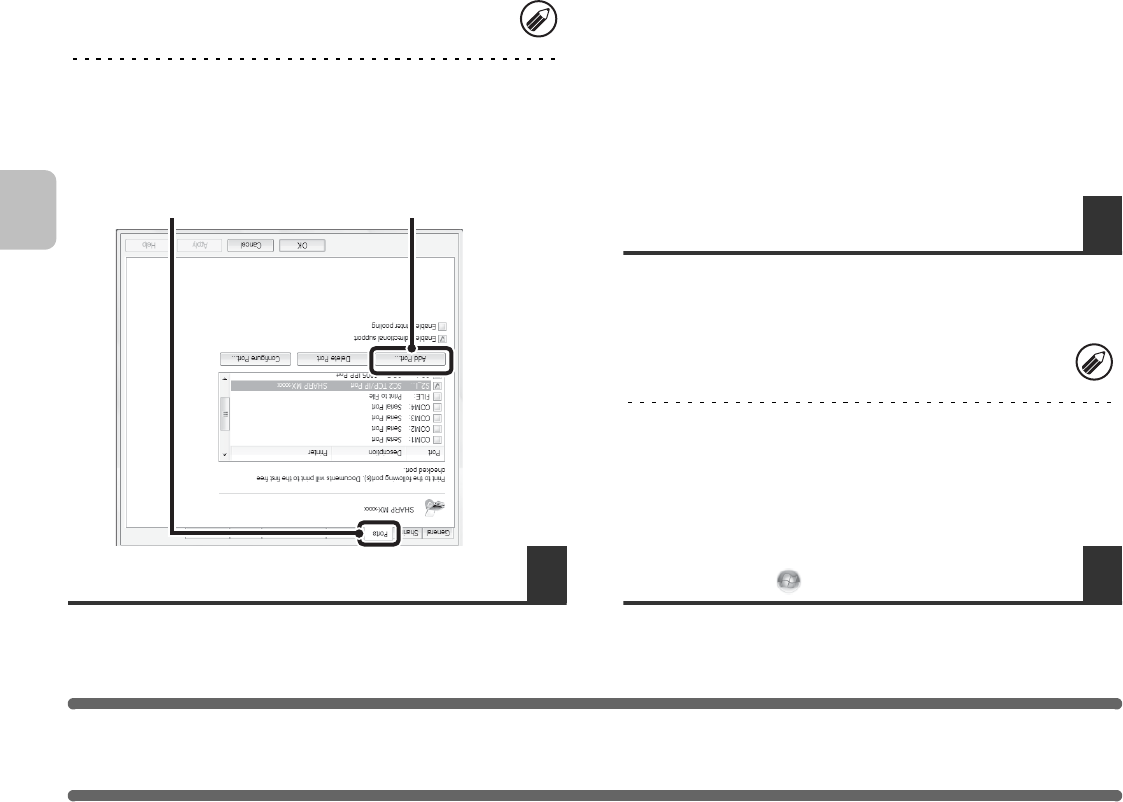
Adding or changing a port.
(1) Click the [Ports] tab.
In Windows 98/Me, click the [Details] tab.
(2) Click the [Add Port] button.
If [Printers and Faxes] does not appear in the [start]
menu in Windows XP, click the [start] button, click
[Control Panel], click [Printers and Other Hardware],
and then click [Printers and Faxes].
To change to a previously created port such as USB
port, select the desired port (USB001, etc.) from the
list and click the [Apply] button. This changes the port.
(2)
(1)
Fichier PDF · ·
Questions sur Sharp MX-4101N
Pas encore de questions sur ce manuel. Posez la première.
Produits connexes et manuels pour Multifonctionnels Sharp MX-4101N
- Multifonctionnels Sharp JW-20FLT Manuel d'utilisateur
 (197 pages)
- Multifonctionnels Sharp MX-C381 Spécifications
(148 pages)
- Multifonctionnels Sharp MX-M260 Manuel d'utilisateur
 (160 pages)
- Multifonctionnels Sharp MX-4101N Spécifications
(12 pages)
- Multifonctionnels Sharp MX-M564N Manuel d'utilisateur
(8 pages)
- Multifonctionnels Sharp MX-M564N Manuel d'utilisateur
(8 pages)
- Multifonctionnels Sharp CPD-3830 Manuel d'utilisateur
(1 pages)
- Multifonctionnels Sharp MX-2010U Manuel d'utilisateur
(12 pages)
- Multifonctionnels Sharp MX-B381 Manuel d'utilisateur
(12 pages)
- Multifonctionnels Sharp MX-7500N Manuel d'utilisateur
(30 pages)
- Multifonctionnels Sharp AL-2021 Spécifications
(91 pages)
- Multifonctionnels Sharp MX-B402 Manuel d'utilisateur
(50 pages)
- Multifonctionnels Sharp FO-155 Spécifications

 (165 pages)
- Multifonctionnels Sharp MX-4140N Manuel d'installation
(19 pages)
- Multifonctionnels Sharp JW-50FL Manuel d'utilisateur
(201 pages)
- Multifonctionnels Sharp MX-4140N Manuel d'utilisateur
(12 pages)
- Multifonctionnels Sharp CPD-3830 Manuel d'utilisateur
(12 pages)
- Multifonctionnels Sharp CD600 - B/W - Fax Manuel d'utilisateur
(23 pages)
- Multifonctionnels Sharp AR-810 Manuel d'instructions
(178 pages)
- Multifonctionnels Sharp AL-1566 Spécifications
(116 pages)